API PORTAL
The API Portal turns any model in your project into a governed REST API: flip a switch, choose the columns, and hand out a URL instead of database credentials. Every call executes the model's logic live against its sources through the federation engine — change a row upstream and the API answers differently on the next request, no dvt run required.
OPENING THE APP
Run dvt serveand the hub opens on your project's suite port (46100 unless suite_port in dvt_project.yml says otherwise). The API Portal is one of the tiles — the management UI lives at /portal, and the data API it publishes lives at /api/v1 on the same origin:
$ dvt serve
# manage:  http://localhost:46100/portal
# consume: http://localhost:46100/api/v1/models
The URLs you hand out are stable by construction: the port is pinned in dvt_project.ymland nowhere else, and DVT never silently hops to a free port — if something else holds the pin, that's a hard error naming the squatter. Bookmarks, proxy rules and every consumer's code keep working, which is the point.
THE MODEL LIST — DENY BY DEFAULT
The portal opens on every model in your project — searchable, filterable by api live / no api — each row showing its target, its materialization, how many of its columns are accessible, and an exposure switch. Nothing is exposed until youflip that switch: a model the portal has never been told about simply isn't an API.
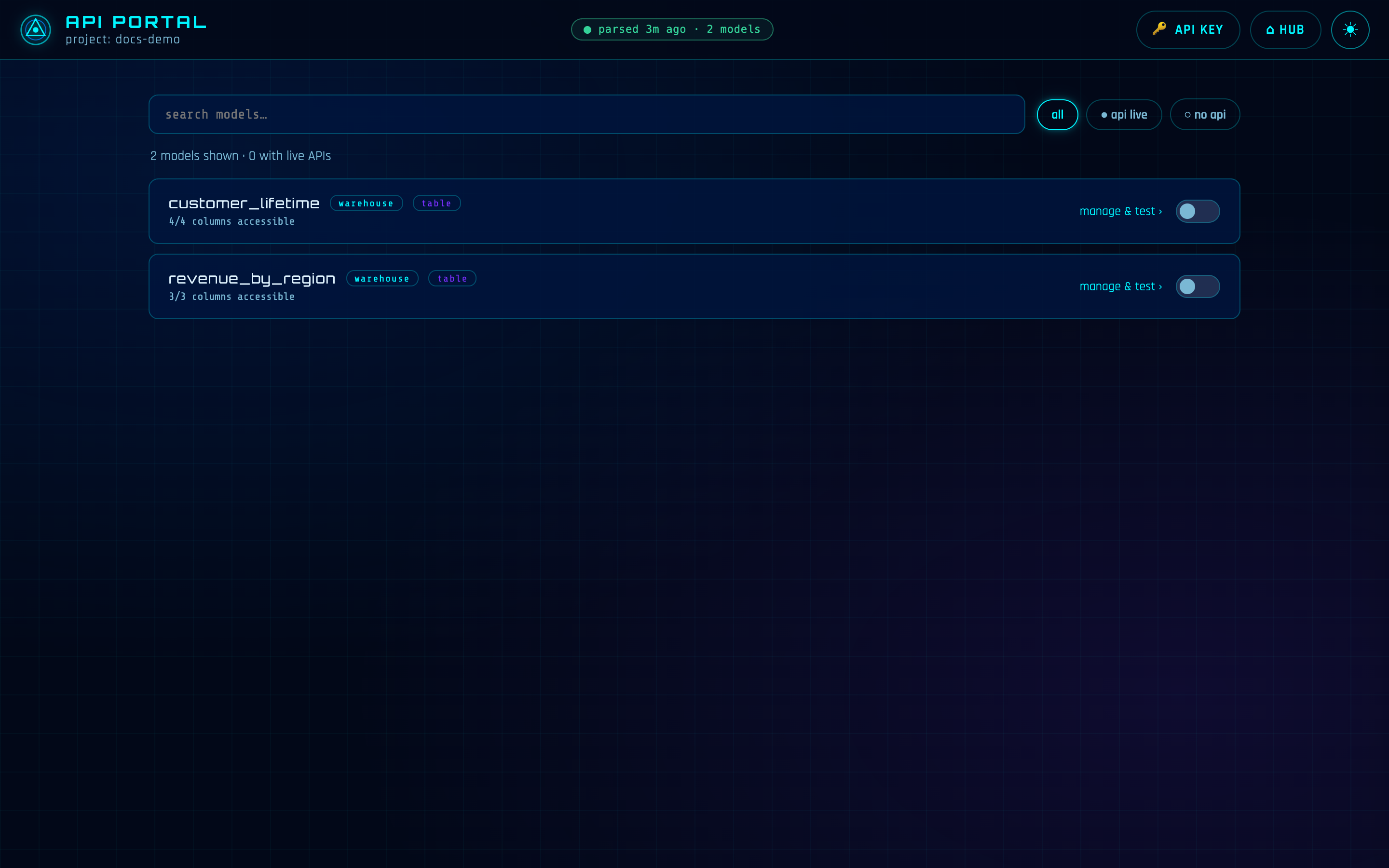
Say your finance team wants order data. Find orders, flip the switch — it now answers at /api/v1/models/orders — then click manage & test to govern what it serves.
THE MODEL PAGE — COLUMNS, ENDPOINTS, PROOF
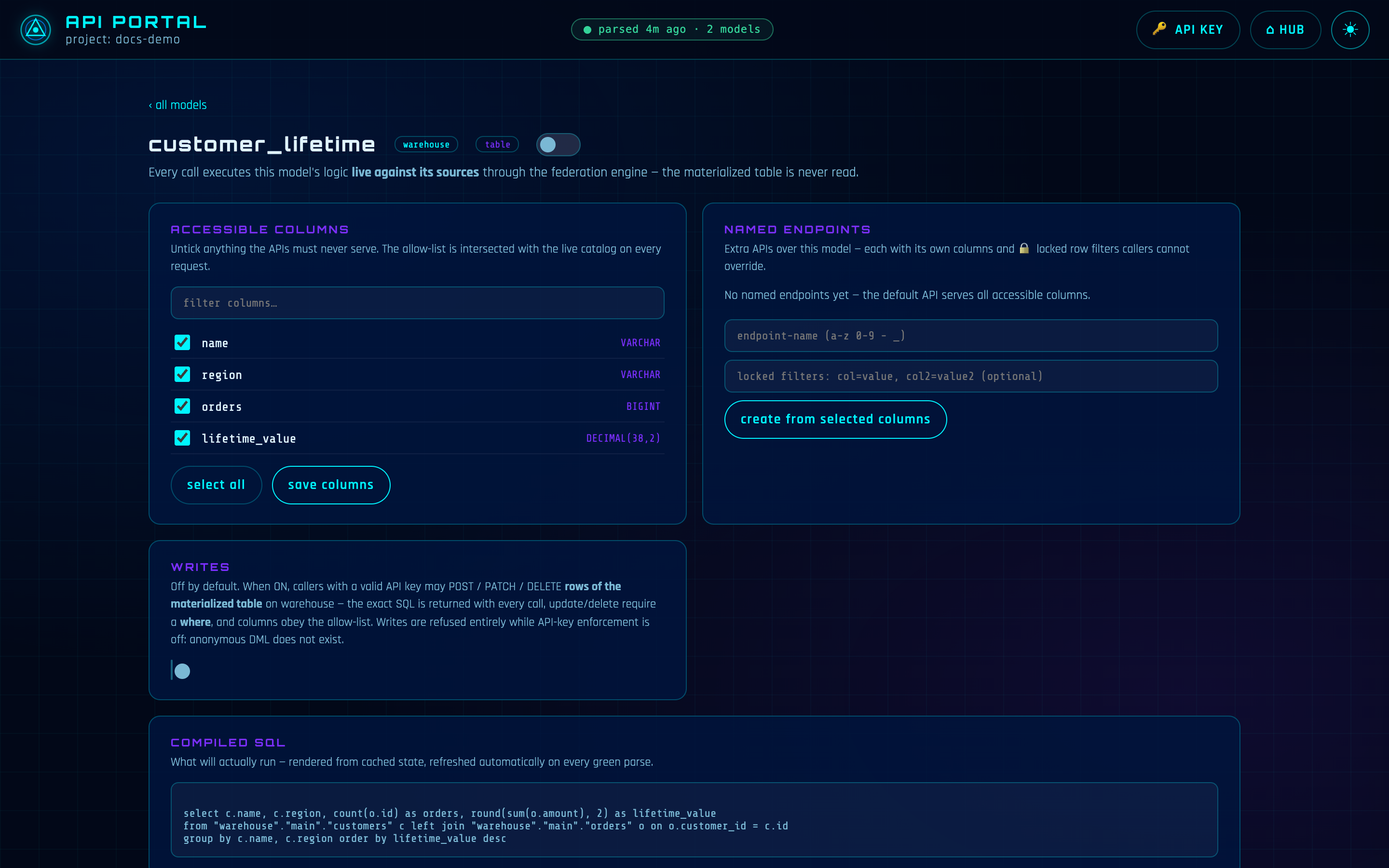
A model's page is a set of cards, each one job:
- ACCESSIBLE COLUMNS — every column with a checkbox. Untick anything the APIs must never serve (the customer email, the margin column) and save. The allow-list is intersected with the live catalog on every request, so a stale config can never widen access.
- NAMED ENDPOINTS — extra APIs over the same model, each with its own column list and locked row filters callers can neither see past nor override. Name it, pick columns, type the locked filters (
region=EU), create. A locked filter may restrict on a column the endpoint doesn't even expose — row-level security in one move:/api/v1/endpoints/orders-euserves only EU rows and theregioncolumn never leaves the server. Trying to override it is a 400. - COMPILED SQL— the exact SQL that will run, straight from the project's compiled state. It refreshes itself every time a green parse lands, so what you read is what executes.
- TEST & CONSUME — pick the default API or a named endpoint, grab a ready-made snippet (curl / Python / JavaScript / Java), or hit ▶ run live and watch real rows come back right there in the page before you send anyone the URL.
READING ROWS
Consumers get plain HTTP: list what's exposed, then page through rows with equality filters on any accessible column. Responses carry "virtualized": true — a reminder that these rows were computed from the live sources just now:
$ curl 'localhost:46100/api/v1/models'
$ curl 'localhost:46100/api/v1/models/orders?region=EMEA&limit=100&offset=200'

{
  "model": "orders",
  "virtualized": true,
  "columns": ["id", "region", "amount"],
  "rows": [{"id": 412, "region": "EMEA", "amount": "29.99"}, ...],
  "limit": 100, "offset": 200, "row_count": 100
}
Filters are exact-match equality and must name accessible columns — anything else is a 400, which doubles as the injection guard: identifiers are validated against the catalog and quoted in the executing engine's own dialect, values are escaped literals. limit defaults to 100 and caps at 1000.
FRESH, NOT FAST
Every call federates for real — expect roughly one to three seconds per request (timeout 120s) while the sources are read live. That buys always-current answers from any mix of engines; it is not a low-latency serving layer.
THE API KEY
The 🔑 API KEY button in the header generates a bearer token — it starts with dvt_, it's shown exactly once, and only its SHA-256 hash is stored. A separate switch turns enforcement on; the portal refuses to enforce before a key exists. With enforcement on, every /api/v1 call needs the header:
$ curl -H 'Authorization: Bearer dvt_...' localhost:46100/api/v1/models/orders
Enforcement is off by default for localhost development. The management UI itself answers only from the local machine — governing the portal is done at the keyboard, not over the network.
WRITES — A SECOND, DELIBERATE OPT-IN
Reads virtualize; writes are different. Each model's page carries a WRITES card with its own toggle, off by default. Switched on, callers may insert, update and delete rows of the model's materialized table on its target — a write needs a real table, not a live computation. The card shows the exact curl calls the moment you enable it:
# insert — POST with {"values": {...}}
$ curl -X POST localhost:46100/api/v1/models/orders/rows \
    -H 'Authorization: Bearer dvt_...' -H 'Content-Type: application/json' \
    -d '{"values": {"id": 9001, "region": "EMEA", "amount": 12.50}}'

# update — PATCH with {"set": {...}, "where": {...}}
$ curl -X PATCH localhost:46100/api/v1/models/orders/rows \
    -H 'Authorization: Bearer dvt_...' -H 'Content-Type: application/json' \
    -d '{"set": {"region": "APAC"}, "where": {"id": 9001}}'

# delete — DELETE with {"where": {...}}
$ curl -X DELETE localhost:46100/api/v1/models/orders/rows \
    -H 'Authorization: Bearer dvt_...' -H 'Content-Type: application/json' \
    -d '{"where": {"id": 9001}}'
The gate is cumulative — all of it, every time: API-key enforcement ON (writes are refused entirely while it's off — anonymous DML does not exist), a valid bearer, the model enabled, its WRITES toggle on, every column inside the allow-list, and a non-empty where on update and delete — full-table updates and deletes are refused outright.
And the API never hides what it ran: every response returns the exact SQL that executed, the connection it ran on, and the affected-row count — plus a standing note that the next dvt run of the model may rebuild its table. Every write is also appended, SQL included, to the audit log at .dvt/web_apps/api-portal/writes.log.
The WRITES card switched on: the exact insert/update/delete calls, key-gated, with the where clause mandatory.
FROM THE CLI
Two commands feed the portal: dvt compile produces the compiled SQL that every API call executes, and dvt docs generateproduces the column metadata the governance layer checks against — the portal asks for it by name when it's missing. Writes land on the table that dvt run built. Whether a model is materialized as a table, a view or even ephemeral makes no difference to reads — the API serves its logic.
REFERENCE
| WHERE | /portal (manage) and /api/v1 (consume) on the suite port (suite_port in dvt_project.yml, default 46100) |
| START | dvt serve (the whole suite; dvt kill stops it) |
| NEEDS | dvt compile (compiled SQL) + dvt docs generate (column metadata) |
| READS | GET /api/v1/models · /api/v1/models/<name> · /api/v1/endpoints/<name> — equality filters, limit 100 (max 1000), offset |
| WRITES | POST / PATCH / DELETE /api/v1/models/<name>/rows — opt-in per model, key-gated, allow-listed columns, mandatory where |
| AUDIT | .dvt/web_apps/api-portal/writes.log — every write, exact SQL included |