CHAT WITH DATA
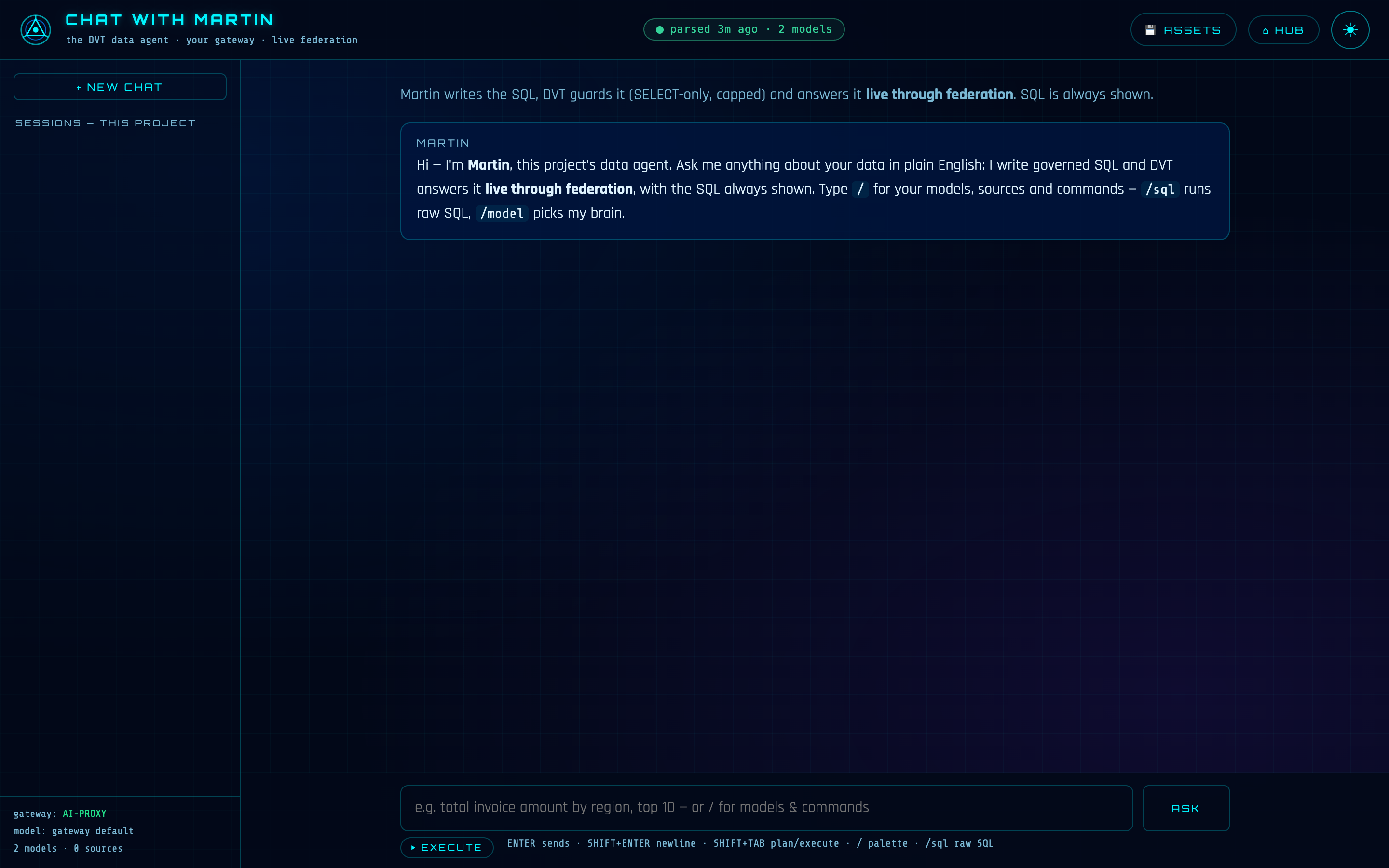
Chat with Data is where you talk to your project. You ask a question in plain language — "which regions drove revenue last quarter?" — and Martin, DVT's data agent, writes the SQL, DVT guards it, and the answer comes back live through the federation engine: a real result from your real sources, with the query that produced it always one click away.
OPENING IT
Run dvt serve in your project and the hub opens in your browser. Click the CHAT WITH MARTIN tile — chat lives at /chaton the suite's one origin (http://127.0.0.1:46100/chatby default; the port is your project's suite_port pin).
$ dvt serve        # the whole suite — hub, chat and the rest, one origin
# then: hub → CHAT WITH MARTIN, or go straight to /chat
Two things make the room useful before you type a word: a parsed project (dvt compile), and — for column-aware answers — a generated catalog (dvt docs generate). And Martin needs a voice: an AI gateway, covered below.
THE ROOM
The layout is a chat you already know how to use. Conversations live in the sidebar, persisted per project and auto-titled, restored in full — tables and charts included. The input understands three gestures: ENTER sends, SHIFT+ENTER breaks a line, and SHIFT+TAB flips between execute and plan mode. Type / and a palette opens with your models (columns included), your sources, and the commands; type @and it lists your project's files, so a question can point at a real file and Martin will read it before answering.
ASKING — AND WATCHING MARTIN WORK
Send a question and the work streams as it happens. Phase lines narrate the stages — thinking with the model, executing the SQL live, rendering — and when Martin investigates first, each step lands in the MARTIN'S WORKtrace the moment it finishes: he might peek at a sample, check a column's spelling, verify a join — each call marked ✓ or ✗ with the real reason. The trace stays under the answer, collapsible, so what he claims is always what you can read.
MARTIN'S WORK streaming live: each investigation step appears as it completes, then persists under the answer.
The answer itself is markdown plus a results table — and when a picture is the honest summary, a chart (bar, line, pie or scatter) drawn from the actual result, theme-aware, downloadable as PNG, the table as CSV, the SQL one COPY away. Ask for ten charts and you get ten: each query runs live in parallel and renders as its own titled block, and one broken query never sinks the batch.
THE GUARD — EVERY QUERY, NO EXCEPTIONS
Martin writes SQL; he cannot make DVT run just anything. Every query — his or yours — passes one guard: exactly one statement, SELECT only, no writes, no DDL, no file-reading functions, and a row limit enforced on every query (capped at 1000). If a generated query fails, the error goes back to the model exactly once for a repair; a second failure is reported honestly, SQL included. When you already know the query, /sql is the direct lane — same guard, same live execution, no model in the loop, badged DIRECT.
PLAN MODE — LOOK, DON'T TOUCH
Press SHIFT+TAB and the chip over the input flips from ⏵ EXECUTE to ◔ PLAN. In plan mode Martin can investigate freely — read files, check columns, sample data — but every tool that changes anything is locked on the server, not just hidden. His answer becomes a step-by-step plan: the files he would create, the configs they would carry, the commands he would propose. Review the approach, flip back, say go.
Plan mode: the ◔ PLAN chip on, and Martin answering with a reviewable plan instead of touching the project.
MARTIN DEVELOPS — HE PROPOSES, YOU APPLY
Ask for a new model, a sources.yml, a schema file or a small fix, and Martin doesn't write it — he renders a proposal card: the full content, a ✓ APPLY button, a DISMISS button. Nothing touches your project until you click APPLY, and Martin never claims a file was written when it wasn't. Small fixes arrive as a reviewable diff card instead of a whole re-typed file. Runs are proposals too: dvt run, test and build execute after your click, with the output landing on the card. The one hard wall: Martin never touches profiles.yml or credentials — connections belong to Settings.
A proposal card: the full file Martin wants to write, applied only by your click — with a timestamped backup on overwrite.
The fastest kick-start is /generate-sources: pick a connection and DVT introspects it live — every schema, every table — and proposes a complete, correct sources.yml as one APPLY-able file. Other commands in the palette follow the same shape: /errors diagnoses the last run and leads to a fix card, /config-checkupreports what's wrong with model configs (and writes nothing), /config-fix puts the provable repairs behind APPLY, and /flip-target-to previews a default-target switch before proposing the real one.
SAVING ANSWERS
A result worth keeping gets a SAVE ASSET button: the question, the SQL and the chart spec are stored in the project, and RERUN LIVE executes it fresh through federation any time. Saved assets are the seed of DVT Dashboards, where each one becomes a card that reruns live.
THE AI GATEWAY — ONE OUTLET, ONE KILL SWITCH
Martin speaks through exactly one outlet: AI-Proxy, a self-hosted, OpenAI-compatible gateway over the AI subscriptions you already own — with local Ollama routing for air-gapped machines. DVT never takes per-token API keys. You add the gateway's base URL and key once, in hub → Settings → AI CREDENTIALS, and /model lets you pick any model the gateway actually serves.
And the project owns the off switch. Set ai_enabled: false in dvt_project.yml and AI is disabled, not muted: credentials are never even resolved, so zero bytes can leave the project for AI — and the chat says so plainly instead of failing in some other shape. No server and no license can turn it back on.
HONEST BOUNDARY
Your question, the catalog index and Martin's conversation go to your gateway — nowhere else. Query results come from your sources through DVT's own federation engine on your machine, and credentials never appear in a prompt, a response, or a log.
HOW IT RELATES TO THE CLI
Chat reads what the CLI produces: dvt compilegives it the project's models and sources, and dvt docs generate makes it column-aware. Every query executes through the same live federation path as an f_tablerun — nothing is cached, nothing reads a stale copy. Sessions and saved assets live under the project's .dvt/ folder, and dvt kill is the one off switch for the whole suite.
REFERENCE
| WHAT | WHERE |
|---|---|
| Path | /chat on the suite origin (suite_port, default 46100) |
| Starts with | dvt serve · stops with dvt kill |
| Needs | a compiled project; dvt docs generate for columns; AI-Proxy configured (hub → Settings → AI CREDENTIALS) |
| Kill switch | ai_enabled: false in dvt_project.yml — zero bytes leave for AI |
| Security | binds 127.0.0.1; asking and saving answer loopback-only regardless of --host |